Instant SEO Checker
Generate a detailed SEO audit for any webpage in seconds.
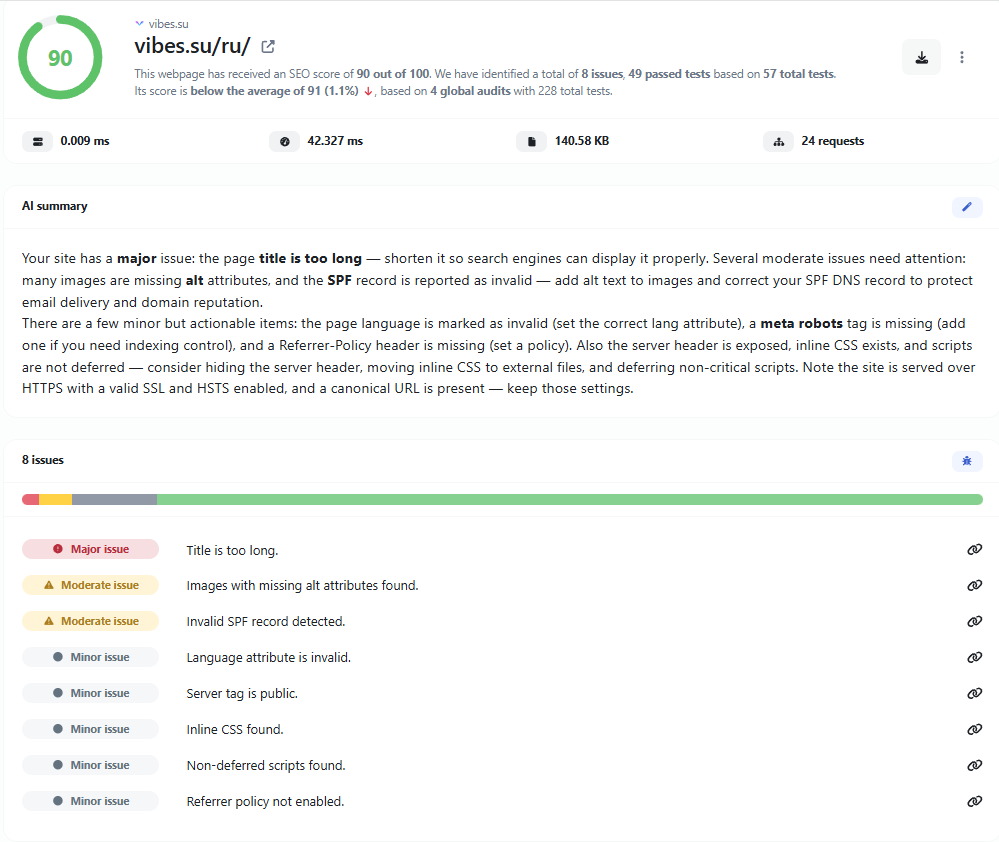
Instant SEO Checker: Audit Any Webpage in Seconds
An SEO audit is the fastest way to understand how well a webpage is prepared for search engines. This tool scans the page you submit and evaluates the elements that influence how search engines crawl, index and display it in results. Instead of guessing which parts of a page need attention, you get a structured report that points to specific issues and explains why they matter.
The checker focuses on the technical and on-page signals that are most commonly linked to search visibility: title tags, meta descriptions, heading structure, image alt attributes, internal and external links, indexability directives, HTTPS usage, mobile viewport configuration and other structural elements. Each check is designed to surface a concrete problem rather than a vague score.
What the SEO Audit Examines
The audit covers a broad set of on-page factors. The exact list of checks can vary, but the following categories are typical for a technical SEO review.
- Title tag: presence, length, uniqueness and relevance to the page content.
- Meta description: presence, length and whether it summarizes the page meaningfully.
- Headings: correct use of H1, logical hierarchy of H2–H6, and whether headings describe the content.
- Images: alt attributes, file naming and general image accessibility signals.
- Links: internal linking, external links, and potentially broken or malformed URLs.
- Indexability: meta robots directives, canonical tags and other signals that affect crawling.
- Technical basics: charset declaration, viewport settings, language attributes and HTTPS usage.
- Content signals: presence of body content, word count and basic structural quality.
Each of these elements plays a different role. A missing title tag is not the same problem as a duplicated one, and a poorly structured heading hierarchy has different consequences than a missing meta description. The report separates these concerns so you can prioritize fixes.
Why On-Page SEO Still Matters
Search engines rely on the HTML of a page to understand what it is about. Before any ranking signal is applied, a page must be crawlable, indexable and clearly structured. If a title tag is missing or duplicated, the search engine has to guess the topic. If a page lacks a meta description, the search engine generates a snippet on its own, which may not represent the content accurately. If images have no alt attributes, both accessibility and image search suffer.
These are not abstract concerns. They affect how a page appears in search results, how often it is clicked and how confidently search engines can classify it. A page that is technically clean is easier to index, easier to understand and easier to present to users. On-page SEO is therefore not a one-time task but a basic requirement for any page that is meant to be found.
How to Read the Audit Results
The report is organized so that each finding can be understood without deep technical knowledge. A typical result includes the name of the check, the current state of the page and a short explanation of the issue. Some checks are pass or fail, while others return more nuanced information, such as the actual length of a title tag or the number of images missing alt text.
It helps to read the results in order of impact. Structural problems such as a missing title or a noindex directive usually deserve attention first, because they affect whether the page can appear in search results at all. Content-level issues such as short meta descriptions or missing alt attributes are important but typically less urgent. The goal is not to fix everything at once but to address the issues that most directly affect the page's ability to be found and understood.
Common SEO Issues Found in Audits
Most pages fail on a small number of recurring problems. Recognizing them makes it easier to interpret the report and decide what to change.
- Missing or duplicated title tags: a page without a title, or several pages sharing the same title, makes it hard for search engines to distinguish them.
- Meta description problems: missing descriptions or descriptions that are too short or too long reduce control over the search snippet.
- Multiple H1 headings: using more than one H1, or skipping heading levels, weakens the document outline.
- Images without alt text: common on pages with decorative or automatically inserted images.
- Broken or redirected links: internal links pointing to non-existent pages waste crawl budget and harm user experience.
- Accidental noindex: a leftover meta robots directive can prevent a page from being indexed entirely.
- Missing viewport tag: pages without a proper viewport declaration may render poorly on mobile devices.
These issues are rarely caused by a single mistake. They tend to accumulate as a site grows, which is why periodic audits are useful even for well-maintained websites.
How to Fix Typical SEO Problems
Once an issue is identified, the fix is usually straightforward. A missing title tag can be added in the page template or CMS. A duplicated title can be rewritten to reflect the specific content of each page. A meta description should be written as a concise summary of the page, ideally within the length that search engines display without truncation.
Heading structure is best handled by reviewing the page outline: one H1 that describes the main topic, followed by H2 sections for major subtopics and H3 for details within them. Image alt attributes should describe the image content when it is meaningful and be left empty for purely decorative images. Internal links should be checked periodically so that they point to live pages.
Indexability issues deserve special care. A noindex directive, a canonical tag pointing elsewhere or a robots.txt rule can all prevent a page from being indexed. These should be verified whenever a page is published or moved.
Practical Uses for an SEO Audit
SEO audits are useful in several everyday situations. Before publishing a new page, an audit confirms that the basic elements are in place. After a site migration, it helps detect pages that lost their metadata or became non-indexable. During a content review, it highlights pages that are structurally weak and could be improved. For client work, an audit provides a concrete, documented list of issues that can be discussed and prioritized.
The audit is also useful for competitive analysis. Running a check on a competitor's page shows how their metadata, headings and structure are organized, which can inform your own approach without copying their content.
Limitations to Keep in Mind
An on-page audit examines the HTML of a single page. It does not evaluate backlinks, domain authority, overall site architecture or ranking positions. It also cannot guarantee that fixing the reported issues will improve rankings, because search algorithms consider many factors beyond the page itself.
Some pages may also be partially inaccessible to automated checks. JavaScript-rendered content, login-protected pages or sites that block automated requests may return incomplete results. In those cases, the audit reflects what could be retrieved, not necessarily everything a browser would display.
Conclusion
An SEO audit turns a vague sense that a page "could be better" into a specific list of things to check and fix. By reviewing title tags, meta descriptions, headings, images, links and indexability signals, it provides a practical starting point for improving how a page is understood by search engines and presented to users. Used regularly, it helps keep a site technically clean as it grows.